Melody Explorer — User Manual
Turn a QWERTY keyboard into a scale-safe MIDI performance controller. No piano skills, no wrong notes.
Contents
- Quick Start
- Interface Overview
- Playing Chords: Base Triads & MODS
- Alternate Keyboard Layouts
- Octave Control
- MPE & Expression (Glide / Slide / Press)
- MIDI Output Setup
- Shortcut Reference
- Tips
Quick Start
- Set Root, Oct, and Scale to match the song you're working on.
- Pick a chord from Base Triads on Scale — click it, or press Ctrl+1 through Ctrl+7.
- Play on your keyboard. The A key is always your root note, at the octave shown in OCT.
That's it — every key you press belongs to the current scale, so there are no wrong notes.
Interface Overview
| Control | What it does |
|---|---|
| Root / Oct / Scale | Defines the key and scale the whole keyboard maps to. |
| Vel / Ch | Note velocity and MIDI channel used when MPE is off. |
| MPE | Assigns each held note its own MIDI channel, enabling per-note pitch bend / timbre / pressure. See MPE & Expression. |
| Poly | When multiple notes are held, chooses which one receives Glide/Slide/Press: All, First, or Last. |
| MIDI Out | Selects the output port. Requires a virtual MIDI port to reach a DAW — see MIDI Output Setup. |
| LAYOUT badge | Shows the active key layout: SCALE, CHROMATIC, or PIANO. |
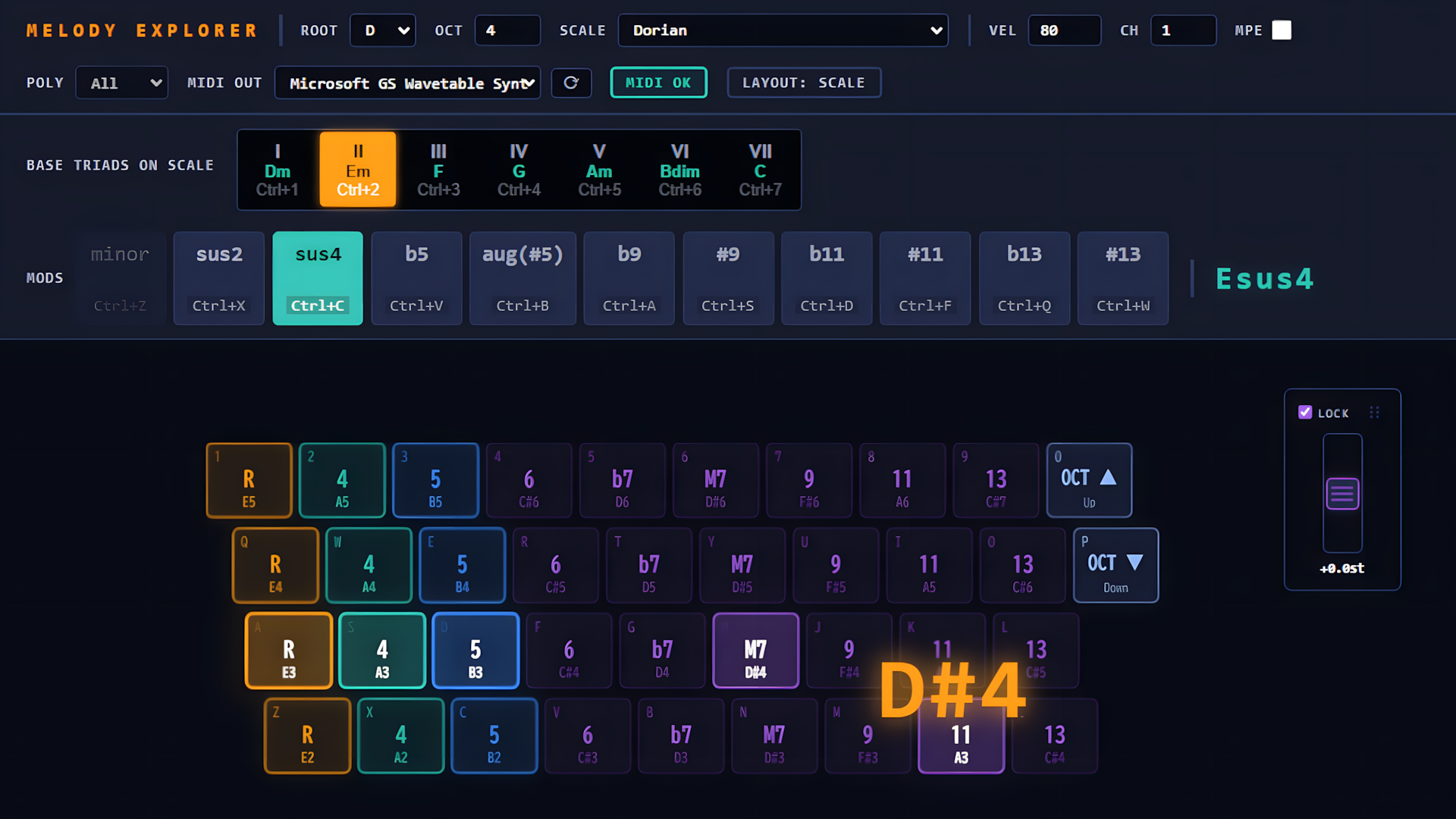
| Base Triads on Scale | The seven diatonic chords of the current scale. |
| MODS | Live chord alterations (sus, b5, extensions...). Current chord name is shown to the right. |
| Keyboard grid | QWERTY keys mapped to chord tones. Column 1 = root, 2 = 3rd, 3 = 5th, then tensions. |
| Pitch wheel panel | Draggable master pitch wheel (top-right of the keyboard view). LOCK prevents accidental dragging of the panel itself; the handle icon lets you reposition it when unlocked. |
Playing Chords: Base Triads & MODS
Each of the 7 scale degrees (I–VII) is a ready-made triad — click one or use Ctrl+1..7. Layer MODS on top to reshape it live (e.g. force minor, sus2/sus4, flat/sharp 5th, 9th/11th/13th tensions). The resulting chord name updates in real time next to the MODS panel.
Alternate Keyboard Layouts
- Hold Shift → Chromatic layout: every row steps up a flat +9 semitones from the row below, ignoring scale/degree/MODS entirely. Good for chromatic runs and fills.
- Toggle Alt → Piano layout: the A/Q rows are white keys, 1/S rows are black keys (~2 octaves), GarageBand-style. Press Alt again to turn it off.
- Shift always wins over Alt while held. Releasing Shift returns you to whatever Alt was set to.
- Base Triads/MODS are grayed out outside Scale layout — they don't apply there.
Octave Control
Use the OCT field, or the 0 (up) / P (down) keys — same physical keys in every layout.
MPE & Expression (Glide / Slide / Press)
With MPE on, each note gets its own channel, unlocking: - Glide — drag the mouse up/down after pressing a note: per-note pitch bend (±2 semitones). - Slide — drag left/right: per-note CC74 (Timbre). - Press (currently disabled in the UI) — channel pressure.
Poly decides which held note(s) respond to Glide/Slide when several are down at once.
The master pitch wheel (top-right panel) always affects the overall pitch: with MPE off it drives the single shared channel directly; with MPE on, its value is blended into every note's own bend.
MIDI Output Setup
Melody Explorer sends MIDI to whatever port you select in MIDI Out — it does not include a synth. To hear or record it in a DAW, you need a virtual MIDI cable: - Windows: install loopMIDI, create a port, select it in both Melody Explorer and your DAW. - macOS: enable the built-in IAC Driver (Audio MIDI Setup → MIDI Studio). - Linux: use ALSA virtual ports or JACK.
Note: Currently, Melody Explorer officially supports Windows. Native macOS and Linux versions are under active development and are planned for a future release.
Shortcut Reference
| Keys | Action |
|---|---|
| Ctrl+1 … Ctrl+7 | Select scale degree (I–VII) |
| Ctrl+Z | MODS: minor |
| Ctrl+X / Ctrl+C | MODS: sus2 / sus4 |
| Ctrl+V / Ctrl+B | MODS: b5 / aug (#5) |
| Ctrl+A / Ctrl+S | MODS: b9 / #9 |
| Ctrl+D / Ctrl+F | MODS: b11 / #11 |
| Ctrl+Q / Ctrl+W | MODS: b13 / #13 |
| Shift (hold) | Chromatic layout |
| Alt (toggle) | Piano layout |
| 0 / P | Octave up / down |
Tips
- Ctrl + mouse wheel zooms the window (the app implements this itself; native browser zoom isn't available in the desktop shell).
- Right-click on the keyboard has no effect — pitch bending moved to the dedicated wheel panel.